14-Day Free Trial · No Strings Attached

Cloud POS Restaurant
that keeps working when the internet goes down

Cloud POS — use it on browser, iPad, mobile, or Desktop App and keep selling even when the internet drops (Offline-Ready) with KDS, QR Self-Order, Loyalty CRM, and Payroll in one package — no hidden fees

No credit card required Ready instantly Cancel anytime
3-in-1 Cloud · Hybrid · LAN
18 Languages
฿590 Starting/mo
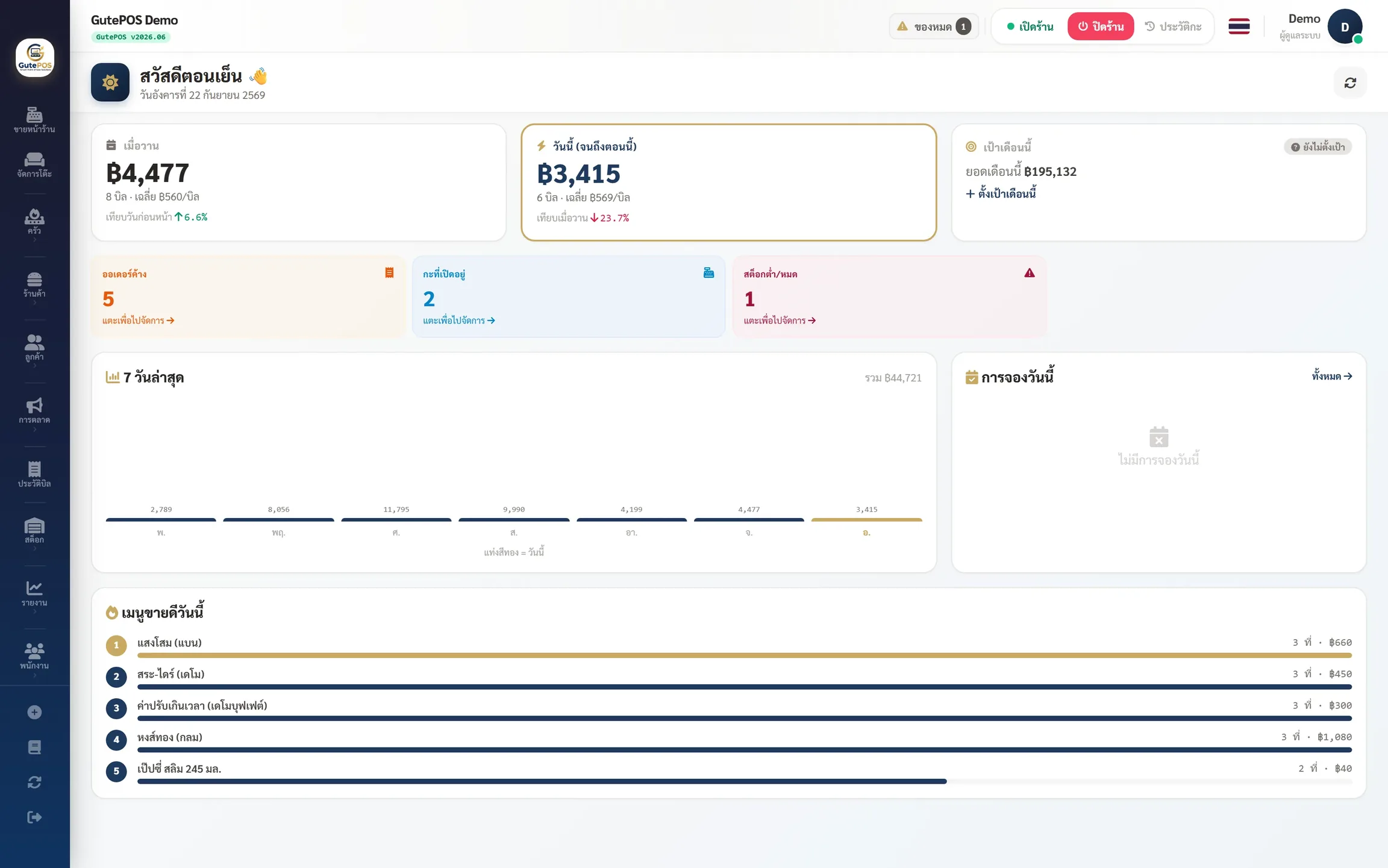
app.gutepos.com — Front-of-house POS
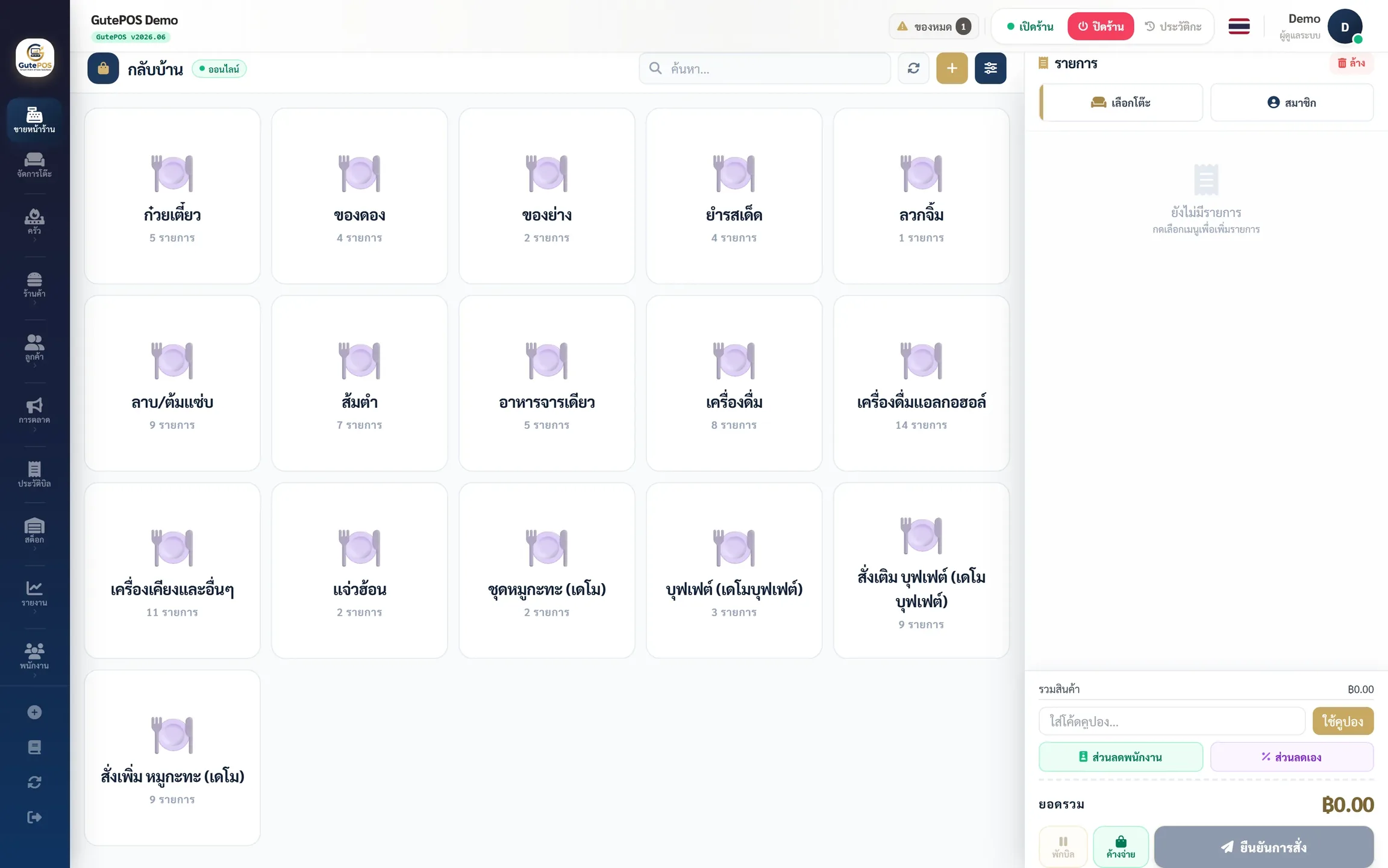
หน้าขาย POS GutePOS — รับออเดอร์ จัดการโต๊ะ คิดเงิน พิมพ์ใบเสร็จ
POS Sale Screenassets/img/shot-pos.png
About Us

Why GutePOS?

The story behind our name, and why we built this system for your store

Gute German

“Gute” means good · fine · quality

We took the German word “Gute” (pronounced goo-teh), meaning “good”, and combined it with “POS” (point-of-sale) — so GutePOS means “a good POS system”: good tools that stand beside your store, making every sale smooth and helping your business grow steadily.

Where We Started

GutePOS was born from the real problems Thai stores face — POS systems that are expensive, lock you into their hardware, and charge hidden fees, and worst of all stop working the moment the internet drops, costing you both sales and your customers' trust. We believe good technology shouldn't be a burden on store owners, so we set out to build a system that is truly “good” as its name says — easy to use, fairly priced, and able to keep working even on days when the internet won't cooperate.

Our Mission

Give stores of every size access to professional-grade management at an affordable price — run your storefront, kitchen, stock, and staff all in one system.

Always Keep Selling

Built Offline-Ready — even when the internet drops you can keep opening bills, taking payments, and printing receipts, then everything syncs automatically once you're back online.

Transparent & Fair

Clear pricing, no hidden fees, no forced hardware purchases. Your data is stored separately per store and securely encrypted — you fully own your own data.

Grow Together

Start with a single store and expand to many branches, with real-time reports that help you decide based on real data, not gut feeling.

Ready to let GutePOS take care of your store?

Start 14-Day Free Trial
Features

Every function your restaurant needs

A complete restaurant management system — from front-of-house to kitchen, with real-time reports

Cloud-First · Works on Every Device

Open a browser, iPad, Android, mobile, or Desktop, log in, and start right away — no server setup required. View sales and manage your store from anywhere.

Front-of-House POS

Easy-to-use POS — table management, split bills, promotions, works with any receipt printer

Kitchen Display (KDS)

Kitchen Display System — auto-queues orders and sends real-time serving alerts

📱 Paperless Kitchen via Telegram NEW

Replace your thermal printer with a "virtual printer" — send kitchen tickets/bar tickets/receipts to a Telegram group. The kitchen views them on iPad/mobile instead of paper, saving ฿1,500-2,000/month on paper + ink, with no need to buy thermal printers at ฿2,500-5,000 each

QR Self-Order

Customers scan a QR to order themselves — multi-language, less staff workload, more sales

Loyalty & CRM

Loyalty points, customer database, spending history — build a base of repeat customers

Omnichannel Unified Inbox NEW

Bring customer chats from LINE OA · Facebook Messenger · Instagram DM · WhatsApp · Telegram · web chat into one inbox — no app switching. Free on every plan

AI Store Analytics NEW

AI summarizes sales · trends · stock forecasts (how many days until ingredients run out) + "Ask your store" answers in plain language from real data — something competitors don't have yet (Pro and up)

Hybrid · Keep Selling When the Internet Drops

The Desktop App has a local cache — even offline you can still open bills/take orders/print receipts/send to the kitchen as normal. Syncs to the cloud automatically once you're back online (Standard plan and up)

Reports & Dashboard

Real-time sales, stock and staff reports — view anywhere on mobile, export to Excel/PDF

Multi-Branch

Manage multiple branches from one place — transfer stock between branches, combined and per-branch reports

18 Languages Supported

Multi-language menus auto-translated by AI — QR ordering ready for international tourists

Payroll + Attendance NEW

GPS / Face Recognition check-in · automatic payroll covering OT (1.5x/2x/3x), social security, absence/leave deductions per Thai labour law, with standard payslips

In-House Delivery NEW

Run your own local delivery — distance-based zones & fee rules, rider teams, order tracking, COD/PromptPay payment, with Telegram delivery alerts

Expense + AI OCR NEW

Track shop expenses — scan receipts with AI for auto data entry, categorize by vendor/category, with P&L reports combining sales and expenses

LINE Employee OA NEW

Staff use LINE OA to check in, view shift schedules, see monthly payslips, request leave/OT via LIFF — no separate app to download
Real Screens

See it in action GutePOS

Real working screens — kitchen display, sales reports, and the mobile app

จอครัว KDS GutePOS แสดงออเดอร์เรียลไทม์
KDS Kitchen Displayshot-kds.png
KDS Kitchen Display
Dashboard ยอดขาย GutePOS แบบเรียลไทม์
Dashboardshot-dashboard.png
Sales Dashboard
QR Self-Order GutePOS ลูกค้าสแกนสั่งเองผ่าน LINE
QR Self-Ordershot-qr.png
QR Self-Order
GutePOS Mobile บนมือถือ พกพา ขายได้ทุกที่
Mobile Appshot-mobile.png
Mobile App
Pricing

Choose the plan that fits your shop

Every plan includes a 14-day free trial — no credit card, cancel anytime

Starter

For small shops getting started

฿590 ฿531 ฿19,900 /mo /mo one-time
฿6,372/yr
Cloud or Desktop App (choose one)
  • Unlimited tables / menu / cashiers
  • Choose from 2 modes: Cloud — browser/iPad/mobile, ready to use instantly
    Desktop App — keep selling offline (single device)
    Want both + Sync → Standard and up
  • 1 POS Station · 1 branch
  • Unlimited staff
  • Front-of-house POS · Shift management · Bill splitting
  • QR Self-Order
  • Promotions / Coupons (basic)
  • Omnichannel Chat (LINE/FB/IG/Telegram in one inbox)
  • PIN Login + Audit Log
  • AI customer-note translation · Onboarding wizard
  • Basic reports
  • Thai + English menus
  • Kitchen Display (KDS)
  • Loyalty / CRM
  • Cloud Sync (Multi-device)
Start 14-Day Free Trial

Pro

Large shops, multi-branch + full HRMS

฿2,990 ฿2,691 ฿89,900 /mo /mo one-time
฿32,292/yr
Hybrid (Local + Cloud Sync)*
  • Unlimited tables / menu / cashiers
  • 5 POS Stations · 2 branches
  • Unlimited staff
  • Everything in Standard
  • Multi-Branch (up to 2 branches)
  • Inventory · Recipe · Inter-branch stock transfers
  • Purchasing system (PR/PO + Approval workflow)
  • Attendance + Payroll (GPS/Face · OT · social security · Thai labor law)
  • Leave Management (Leave management + approval)
  • Staff welfare (OC)
  • LINE Employee OA (LIFF payslips + clock-in + leave requests)
  • AI Analytics (Sales analytics + stock forecasting + ask your store)
  • B2B Pack included free (Quotation + Credit sales + AR Aging)
  • WHT withholding tax (PND export)
  • e-Tax Invoice (Electronic + email delivery)
  • Accounting Export (FlowAccount / PEAK / Xero)
  • Review Management (Google + in-app reviews combined)
  • Staff shift scheduling (Staff Scheduling)
  • Mobile App (Android)
  • Menu 8 languages (choose from 18) + Advanced Dashboard
Start 14-Day Free Trial

Business

Chains · Franchises · Multiple brands

฿4,990 ฿4,491 ฿149,900 /mo /mo one-time
฿53,892/year
Hybrid (Local + Cloud Sync)*
  • Everything in Pro
  • 15 POS Stations
  • 4 branches (Multi-Branch)
  • Multi-Brand (Multiple brands under one account)
  • Multi-Vertical (Business type per branch)
  • Multi-Warehouse (Multiple warehouses)
  • Franchise Dashboard (Compare performance across all branches)
  • API Access (REST API + Webhooks)
  • Custom Reports / Dashboard
  • Full feature set 18 languages (Every language the system supports)
  • Priority Support (4-hour response time)
Start 14-Day Free Trial

Enterprise

Restaurant groups · International franchises

Contact
Flexible (Cloud / Hybrid / Self-hosted)
  • Everything in Business
  • Unlimited POS stations
  • Unlimited branches
  • Full feature set 18 languages
  • Custom Domain / White-label
  • SLA + Priority Support + Dedicated AM
  • Custom API Integration
  • Training included
  • Lifetime license available — priced by number of branches + annual maintenance (AMC)
  • Flexible Deployment
Contact Sales

* Hybrid mode (Local + Cloud Sync) Additional Cloud Sync fee applies ฿290/month Beyond the plan fee — the Desktop App requires installation on PC/Windows 10/11 (free download) · If you use Cloud SaaS only (browser/iPad/mobile), there are no extra costs

Mobile App — Android APK ready to use (Pro plan and up) · No native iOS app yet, but it runs in Safari/Chrome browser on every plan

Lifetime License — pay once, use forever Never expires · Includes free software updates for 1 year after purchase (renew with the 12% annual AMC afterward — if you don't renew, it still works forever + free security patches) · Tied to 1 branch (contact support to move devices · Enterprise is priced by number of branches — contact sales) · Excludes Cloud Sync fee of ฿290/month if using Hybrid mode · Enterprise: Lifetime license priced by number of branches (base covers the first 10 branches) + annual maintenance (AMC includes updates/SLA) — contact sales for a quotation

Payment options

1 month Full price
3 months Full price
6 months Full price
2 years Save 15%
Lifetime One-time payment
ROI Calculator

How much can you save per month?

Enter your store details and see how much switching to GutePOS is worth

Your store details

Results (estimated)

Net savings / value
฿0
per month · ฿0/year
  • Estimated sales/month฿0
  • Paper + ink savings Paperless฿0
  • Features competitors charge extra for (KDS/Self-Order)฿0
  • Prevented sales loss during outages Offline฿0
  • Total saved / recovered฿0
  • GutePOS cost฿0
Free 14-day trial →

* Conservative estimates — actual results depend on each store's usage · Paperless = replace kitchen paper tickets with Telegram delivery

Deployment

Pick the deployment that fits your shop

GutePOS supports 3 deployment modes — flexible to your needs

Cloud

100% Online

  • Access from anywhere, any device
  • Automatic daily backups
  • Automatic updates
  • Remote reporting
  • Requires constant internet

On-Premise

Fully Offline

  • No internet needed at all
  • Pay once, no monthly fees
  • All data stays in-store
  • Manual backups required
  • No remote reporting

How does "keep selling even when the internet is down" work?

When installed as Hybrid or On-Premise (via Desktop App), all store data, menus, and sales live on the machine at your store — when the internet goes down, the systemkeeps running at full capacity:

  • ✅ Open tables / take orders / check out / split bills as usual
  • ✅ Print receipts + send orders to the kitchen (KDS) over in-store LAN/WiFi as usual
  • ✅ Sales are saved tothe local database at your storeinstantly (a real server is installed on the machine) — no lost bills
  • ⏸️ Paused until the internet returns: customer QR self-ordering (staff take orders via POS instead) · LINE/Telegram notifications · viewing reports from outside the store · PromptPay QR/card payments (cash works instead)
  • 🔄 When the internet returns (Hybrid), the system syncs to the Cloud automatically — nothing extra to do, no data lost
  • 💡 Recommended: Add a 4G/5G backup connection (SIM router or mobile hotspot) — everything, including QR ordering and PromptPay QR, comes right back, for just a few hundred baht a month

Mode Cloud (browser-based) requires an internet connection — for stores with unstable internet, we recommend Hybrid

Compare

Why GutePOS?

Compare real features and software pricing against the various POS system types in the market — an overview of system types, Q1/2026

Swipe left/right to see the full table

Compare GutePOS features and pricing with the various POS system types in the market — data as of Q1/2026
Feature / System 🏆 GutePOS Hardware
Bundle
Freemium
+Add-on
SaaS
Mid-tier
Marketplace
POS
Cloud
Overseas
Generic
Multi-business
💰 Software Pricing (system-type overview)
Cost/month ฿1,290 ~฿700-1,000 1 Free + Add-on 2 ~฿1,200-1,500+ 3 ~฿800-1,200 4 Contact for quote 5 Contact for quote 6
Lifetime purchase Yes ฿39,900 No No No No No No
Proprietary hardware required Standard PC / mobile Dedicated hardware ~฿18,000-30,000 1 Not required iPad required Android / Windows Android / iPad iPad / Android
⚡ Core Features (included in the mid-tier package)
Keep selling even when the internet is down (Hybrid/On-Premise mode) Full-featured Online only Online only Online only Online only Online only Online only
Kitchen Display (KDS) Included Included Included (Free) 2 Included Included Depends on plan
QR Self-Order Included QR Menu only Extra cost 3 Included Included
Multi-language menu 18 languages (AI) 2 languages 3 languages
Loyalty / CRM Included Add-on +$25/month 2 Included Included Included Included
Desktop App (Windows) Windows
Multi-Branch Pro+
Multi-Vertical Business type per branch + menus per business type Enterprise
Yearly discount / Lifetime 10–15% off / lifetime license available Yearly -17% 2
✨ New Features Q1-Q2/2026
Payroll + Attendance (Thai law) Pro+ (included) Separate add-on
GPS + Face Recognition check-in Pro+
In-house delivery (Zones/Riders) Standard+ Via aggregator only
Expense + AI receipt scanning Standard+
LINE Employee OA (LIFF Payslip) Pro+
Multi-Station KDS (Kitchen/Bar/Dessert) Standard+ (3 stations Pro+) 1 display 1 display 1 display 1 display 1 display
Customer display (slides + video) Standard+ List only

1 Dedicated-hardware POS (Hardware-bundled): Software starts ~฿700-1,000/month + you must buy the provider's dedicated POS hardware, priced around ~฿18,000-30,000 (depending on model)

2 Free POS + Add-on (Freemium): The basic POS is free, but features such as Employee Management, Kitchen Display and Advanced Inventory must be purchased as separate Add-ons at ~$25/month per module (~฿800-900). Yearly plans typically save ~15-17%

3 Restaurant POS SaaS (mid-tier group): Starts ~฿1,200-1,500/month, mid-tier ~฿2,000-2,800/month. QR Self-Order (Mobile Order) usually carries an extra fee or is only available in higher tiers

4 POS Marketplace-tied: Software starts ~฿800-1,200/month depending on store type (Quick/Full Service) + hardware costs for various models, locked to the provider's Marketplace platform

5 Foreign Cloud POS (Regional): Pricing usually requires contacting the sales team; typically offers Starter/Advanced/Pro packages priced around ~฿900-2,800/month

6 Generic multi-business POS: Offers several packages (FOOD/RETAIL/SERVICE); pricing is usually on request, typically ~฿1,000-1,800/month

⚠️ The prices above are a general overview of system types in the market and do not refer to any specific provider — each provider may differ in features/pricing from this overview Please verify current pricing directly with each provider before deciding

3-Year Software Cost (TCO) — an overview of system types in the market, Q1/2026

GutePOS Standard lifetime license ฿39,900
฿39,900
Dedicated-hardware POS (Hardware-bundled) ~฿800/month x 36 (excluding hardware ~฿18,000+)
~฿29,000
POS Marketplace-tied ~฿1,000/month x 36 (excluding hardware)
~฿36,000+
GutePOS Monthly Standard ฿1,290 x 36
฿46,440
Restaurant POS SaaS (mid-tier group) ~฿1,200-1,500/month x 36 (starting)
~฿45,000+
Free POS + Add-on (Freemium) Free + Employee+Adv.Inv. ~$50/month (~฿1,800) x 36
~฿64,800

Dedicated-hardware POS (Hardware-bundled) Cheap software (~฿29,000/3 yrs) but requires proprietary hardware ~฿18,000-30,000, ~฿47,000-59,000 total, and usually cloud-only — the whole store goes down when the internet drops · QR Self-Order is view-menu only

Free POS + Add-on (Freemium) Free for basic POS, but Employee Management + Advanced Inventory costs ~฿64,800/3 yrs — still no QR Self-Order, multilingual menus, or Desktop App, and no offline guarantee

GutePOS Lifetime ฿39,900 is the lowest total cost that bundles Cloud SaaS (browser/iPad/mobile) + QR Self-Order + Multi-Station KDS + 18 languages + selling through internet outages (Hybrid Desktop App) in one package — runs on ordinary PCs/phones, no proprietary hardware required

FAQ

Frequently Asked Questions

Got questions? We've got answers

What's the difference between a lifetime license and a monthly plan?

Monthly / Yearly — pay per billing cycle, cancel anytime; ideal for stores that want to try first or keep monthly costs low

Lifetime purchase — pay once, use for life, never expires, no renewal needed; includes free software updates for 1 year after purchase

Example: Standard monthly ฿1,290 × 36 months = ฿46,440 vs lifetime license ฿39,900 — breaks even in ~31 months (~2.5 years)

Do lifetime licenses get updates? Are they free?

Yes — free software updates for 1 year from purchase, with new features and bug fixes delivered automatically. After that, renew the annual maintenance pack (AMC) at 12% of the lifetime price for continued updates + support — if you don't renew, the system still works forever and you still get free security patches

Can I switch PCs after buying a lifetime license?

Yes — the license is tied to 1 branch. To move machines or switch PCs, just contact support and our team will transfer the license within 1 business day

With a lifetime license, do I still pay the ฿290/month Cloud Sync fee?

It depends on the mode you use:

  • Cloud SaaS (browser/iPad) — no extra cost
  • Hybrid mode (Desktop App + works even when the internet is down) — a separate ฿290/month Cloud Sync fee applies, covering real server-side infrastructure costs
  • On-Premise (installed on your store's LAN only) — no extra cost
Can I keep selling if the internet drops at my store?

Yes — in Hybrid/On-Premise mode, a real server + database is installed on the machine at your store, so you can open bills / take orders / check out / print receipts / send to kitchen (KDS) 100% as normal even when the internet drops. Data is saved locally right away with no lost bills, and syncs to the cloud automatically once you're back online

Customer QR self-ordering: pauses temporarily during an outage — have staff take orders via POS instead (fully functional), or add a4G/5G backup connection (SIM router/hotspot) and everything, including QR ordering, comes right back

What devices does GutePOS work on?

Works on every device — any browser (Chrome / Safari / Edge), iPad, Android tablets, smartphones, and Windows PCs via Desktop App. No proprietary hardware required

Ready to start with GutePOS?

14-day free trial — no credit card, no conditions, cancel anytime

No hidden fees
Cancel anytime
1 year of free updates
Contact

Interested? Get in touch

Our team is ready to advise and help you pick the right plan

Contact channels

LINE Official Account

@gutepos

Fast replies 9:00-21:00 (daily)

Add LINE Friend

Email

info@gutepos.com

For general enquiries and questions

Send Email

Phone

0963906393

Sales 9:00-18:00 (Mon-Fri)

Call Now

Facebook Messenger

GutePOS Solutions

Chat via Facebook Page

Send Message

Message Us

Fill in the form below — our team will reply within 24 hours